
Translate WordPress pages with elssle Language
Translate a WordPress website with elssle Language using your own OpenAI API key. Start with the public pages your readers need most, then check the translated layout and links on the live site.
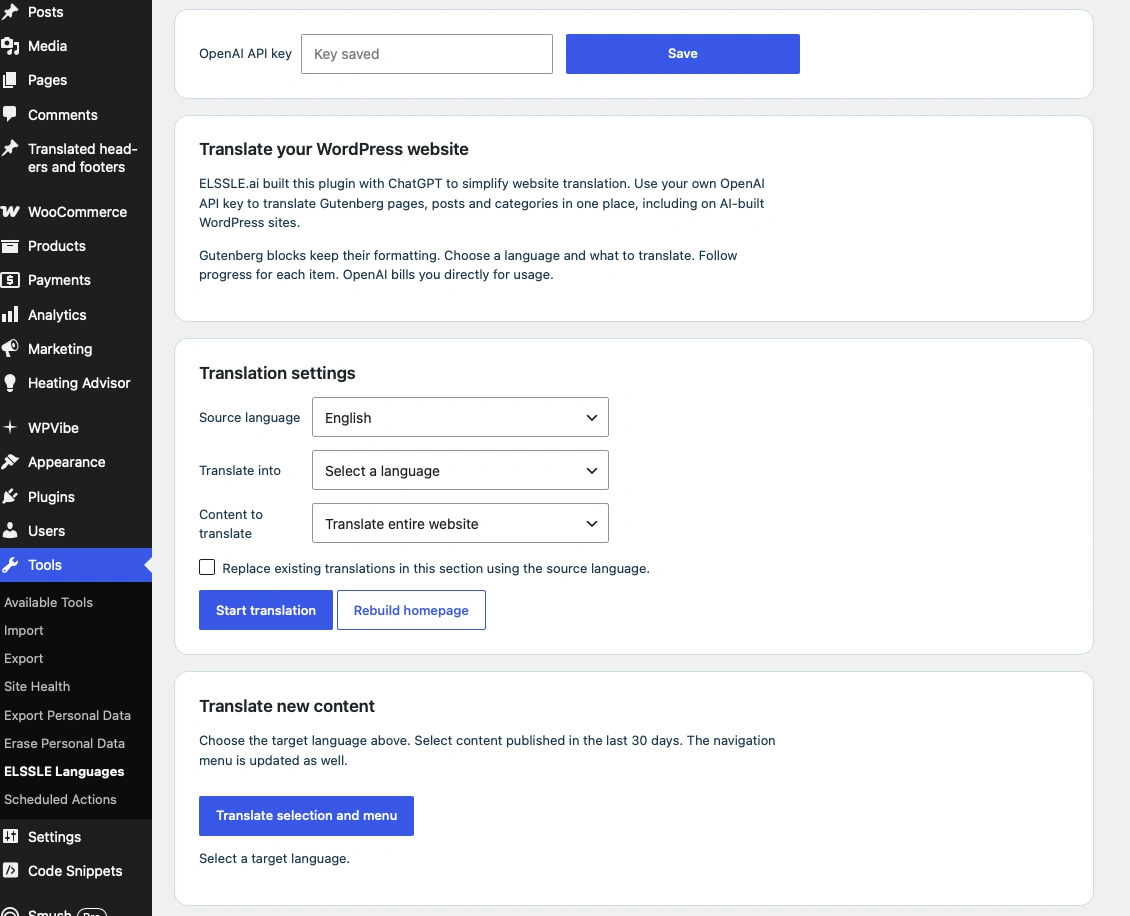
Translate WordPress pages with OpenAI
OpenAI API key / Save translate WordPress pages with OpenAI
Open elssle Language under Tools, enter the key and save. Keep the key in the settings form. OpenAI bills the calls made using your key.
Source language / Translate to
Set the site’s source language. Select a target language or all six other supported languages. Start with one short page to review terminology before translating the entire site.
Choose pages and run the workflow
Section and page selection
Choose pages, a full website workflow or styling, as appropriate. Select the pages you want the translator to process. Leave unrelated pages out of the initial batch.
Start translation and progress
Start the run and follow the progress list. Choose whether to preserve existing translations or replace a selected translation only when it needs a fresh version.
Review the translated page
Open the public page. Check the title, paragraphs, image captions, navigation and links. Review both desktop and mobile layouts and correct any product terminology that should stay in its original form.
Manage your global reach by using your own API key to translate WordPress pages with OpenAI. This approach lets you control costs directly through your OpenAI account while ensuring your content is handled by advanced AI models. To get the best results, begin by translating a few short pages. This allows you to verify that the terminology fits your brand before you process your entire site. You can easily select specific sections or run a full website workflow from the Tools menu.
After you translate WordPress pages with OpenAI, spend time reviewing the live site on both desktop and mobile devices. Check that image captions, navigation menus, and links remain functional and visually aligned in the new language. If certain product names or technical terms should remain in the original language, you can manually correct them during this review phase. You also have the choice to preserve your existing translations or replace them only when a fresh version is required.