
Website Chat with elssle SEO
Set up the elssle chat widget to help visitors find answers from your website. Confirm how the widget looks, who receives contact messages and how it behaves when the answer is unavailable.
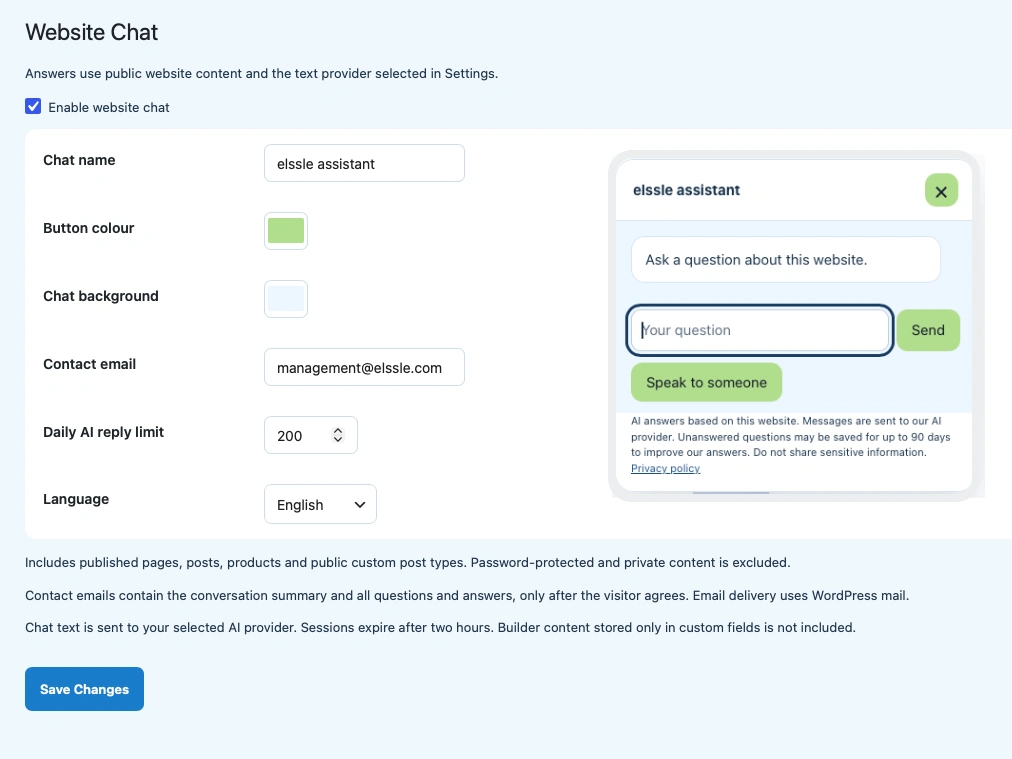
Configure your WordPress website chat assistant
Set up your WordPress website chat assistant
Enable the chat and choose the name visitors will see. Use a name that sets a clear expectation about what the helper does.
Button colour / Chat background
Pick colours that provide sufficient contrast. Test opening, reading and closing the chat on a mobile screen.
Language / Contact email / Daily AI reply limit
Choose the default language, verify the inbox for contact requests, and set the reply limit when your edition exposes that field. Test the contact flow with an appropriate test message.
Test the visitor flow
Save and try a real question
Save your settings and test a question the site already answers. Check whether the result reflects the right page and language.
Contact and Questions
Test the route to a human when the chat cannot answer. Review unanswered questions in Questions and approve an answer once you verify it against the public website.
Set up your WordPress website chat assistant to streamline how visitors get information. By customizing the button colors and background, you ensure your chat widget blends perfectly with your brand while remaining easy to read on mobile devices. Choosing a clear, descriptive name for the assistant helps manage visitor expectations and encourages more engagement. Once you have configured your contact email and language preferences, you can ensure that every inquiry reaches the right person in your team without any delays.
Regularly monitoring the questions section allows you to refine your WordPress website chat assistant for better accuracy. When the AI cannot find an answer on your site, you can review these gaps and approve new responses based on your public content. Testing the flow with real questions ensures that visitors are guided to the correct pages in the right language. This process transforms your site into a self-service hub that reduces manual support while improving the overall user experience.