
Translate WooCommerce products and categories
Translate WooCommerce product and category content with elssle Language so shoppers can read descriptions in their language. Work in manageable batches and review the product and category pages before promoting the translated shop.
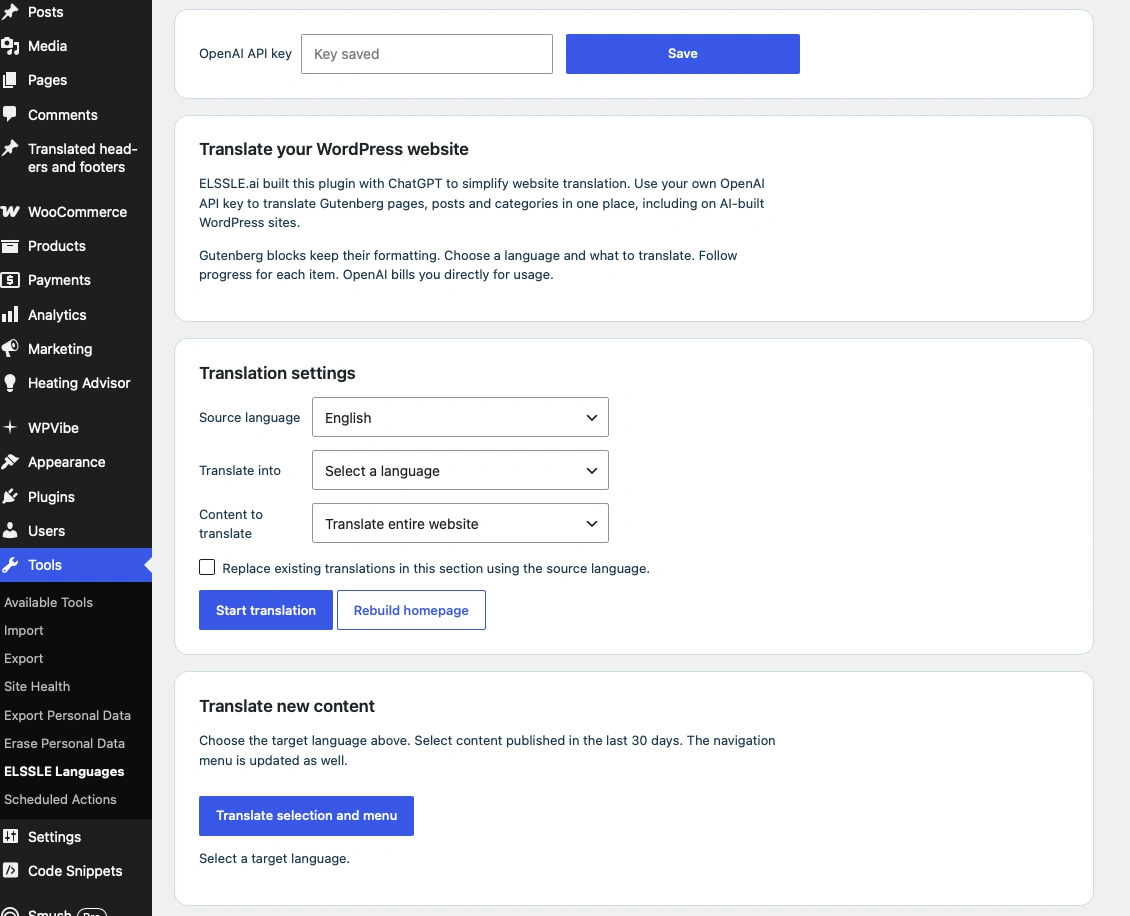
Choose your language to translate WooCommerce products and categories
Source language / Target language to translate WooCommerce products and categories
Confirm the original shop language and select the language you want to translate into. Use a small sample from one product family before translating the full catalogue.
Products and product categories
Choose the appropriate WooCommerce operation and select the items to translate. Product names, descriptions and category names need to match the wording customers use.
Run the translation and check a purchase path
Start translation and review progress
Use the saved OpenAI API key and monitor the result per item. Keep existing translations if a member of the team has already reviewed them.
Review shop pages and navigation
Open a category, a product and the path back to the shop in the selected language. Review labels, search terms and the visible product descriptions.
Check transactional text
Review checkout, emails, currency and shipping separately against your store’s configuration. Verify how site-specific extensions handle their own text before announcing another language.
Expand your reach by making your store accessible to a global audience. When you translate WooCommerce products and categories, you ensure that your descriptions and titles resonate with local shoppers in their own native tongue. This process allows you to maintain a professional image across different regions without manually rewriting every single item. By using manageable batches, you can maintain quality control and ensure your terminology remains consistent across your entire digital storefront before you go live.
Quality assurance is a vital part of the workflow to ensure a smooth customer journey. After you translate WooCommerce products and categories, take the time to test the complete purchase path, from the category navigation to the final checkout page. Check that your transactional emails and shipping labels match your store's specific configuration and that all site extensions display correctly. This final review prevents technical friction and helps you build trust with international customers through a polished, localized shopping experience.