
Installation with elssle SEO
Install elssle SEO in WordPress, set the language and connect the service or provider you will use. If you already have SEO metadata, decide how to handle it before changing which plugin manages the site.
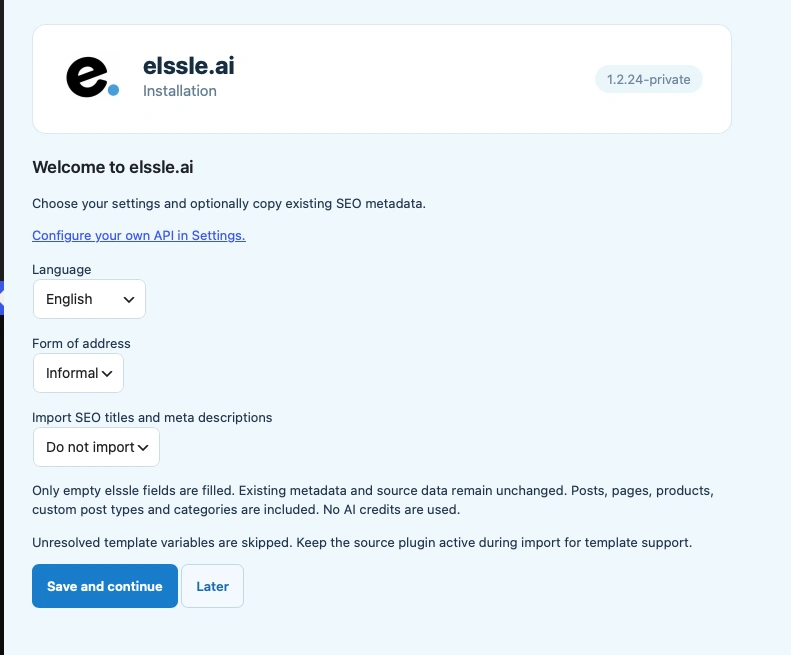
How to install elssle SEO
install elssle SEO: WordPress Plugins and Website code
Install the ZIP from the account or package supplied for your edition, activate it and open the setup screen. Enter the code for this website when the edition prompts for it.
Language and Form of address
Select the default writing language and choose formal or informal writing for your audience.
Decide how to import existing SEO metadata
Import SEO titles and meta descriptions / Do not import
Select the relevant source only if you want to copy fields from your previous SEO plugin. Choose Do not import when starting without existing metadata or when you want to review it first.
Save and continue / Later
Save when your settings are ready. Use Later if you need to gather the correct credentials. If importing, keep the screen open until it reports completion and review a few existing pages before changing where their metadata is managed.
Final checks
Verify the site code, provider choice, a sample SEO title and the sitemap when setup is complete.
Getting started is simple once you install elssle SEO through your WordPress dashboard. After uploading the provided ZIP file and activating the plugin, you can quickly enter your site code to unlock the full features of your edition. Take a moment to select your preferred writing language and the form of address that best fits your audience's tone. These initial choices ensure that your content remains consistent and professional across all your pages from the very beginning of your optimization journey.
When you install elssle SEO, you have full control over how your previous metadata is handled. You can choose to import existing titles and descriptions from another plugin or start with a clean slate to refine your strategy. Once you save your settings and connect your service provider, remember to verify your sitemap and a few sample titles. This final check confirms that everything is running smoothly before you begin managing your website's visibility and search engine performance.