
Find your tools in the elssle SEO dashboard
Use your SEO control panel to find the tool that matches your next WordPress task. Start with setup, select a service and return to the main screen when you move from writing to site maintenance.
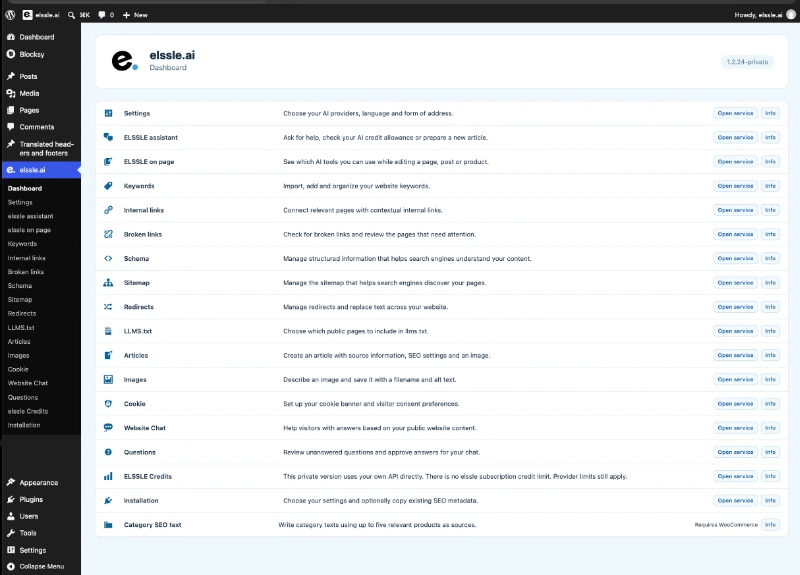
Your elssle SEO dashboard
Your elssle SEO dashboard cards
Read the summary under each service before opening it. For example, Keywords is for choosing and assigning search terms, and Internal links is for connecting existing content.
Open service
Opens that card’s WordPress screen. Use the specific service to make changes, then return via elssle SEO in the WordPress admin menu.
Requires WooCommerce
A category or product feature is available only if WooCommerce is active. Check whether the task concerns a regular page or a product category before you start.
Work through a website
Start with Settings and Website profile
Choose the writing language and available providers. Describe your business once so future writing tasks have a reliable understanding of what you offer.
Move to On page and Keywords
Open the WordPress editor when you know which page needs work. For multiple pages, prepare a list of distinct focus keywords first so two pages do not compete for the same purpose.
Finish with maintenance
Use Broken links, Redirects, Schema and Sitemap as separate checks. Start with one affected URL and verify each change on the public website before repeating it elsewhere.